 ETHORITY®
AI Estate Workspace
€5,990 / year
Inventory structure linking systems, purpose and accountable owner.
Bring the known AI inventory into one working context.
AI Estate SaaS
Bring the known AI inventory into one working context.
€5,990 / year net · EUR
Demonstration · early access on request
CIOs, AI governance owners, security, procurement and business-unit leaders.
Tools and pilots are difficult to govern when no one can connect them to owners and evidence. Workspace defines the entry SaaS scope for an organizational AI inventory.
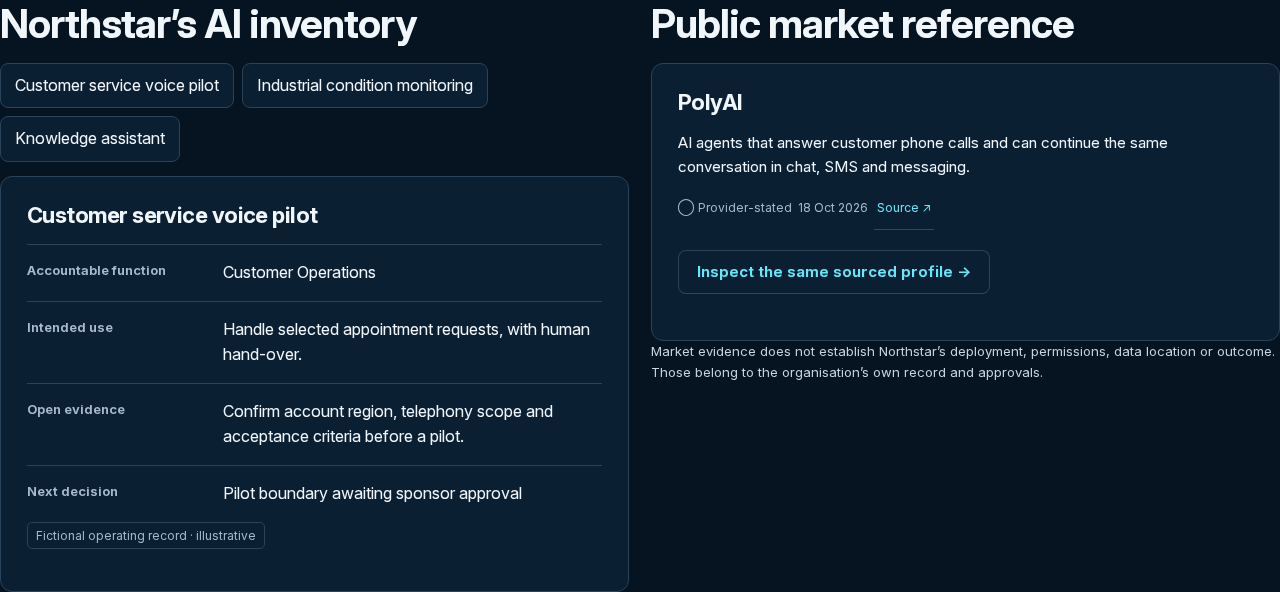
An AI estate includes purchased tools, embedded features, models, agents and pilots. The product family connects inventory, responsible owners, evidence and operating decisions. The public specimen uses a fictional organization so you can inspect the intended working model without sharing customer data.
Follow a fictional business question through systems, selected profiles, evidence, economic assumptions and a decision record. The example connects owners and review questions so a team can see what information belongs together.
Define the organisation, users, roles and permission boundaries. Agree retained evidence, storage, retention and the responsible service owner before customer activation. Persistence, reminders and change watches belong to the specifically agreed service scope.
Define the organization, inventory scope and accountable owners.
Map systems to vendors, evidence, use cases and decisions.
Agree the operating environment and validate access before onboarding.
Agree inventory boundary, users and storage requirements. Do not upload private inventories to the public demonstration.
Bring the decision you need to make and your intended use. Agree the relevant users, product or organisation boundary, permitted evidence and acceptance conditions. Any service or subscription begins on its agreed start date.
A clear specification for a workspace that can connect the inventory to ongoing governance.
Available as a demonstration; early access on request. Customer activation requires agreed isolation, persistence, roles, data handling and support. The public example uses fictional organisational data.
€5,990 / year
Inventory structure linking systems, purpose and accountable owner.
Bring the known AI inventory into one working context.
€12,000 / year
System-to-function and owner relationships.
Connect the inventory to business ownership.
€18,000–€50,000+ / year
A configured organization and system boundary.
Understand the estate across organizational boundaries.
Fee configured to agreed scope
Defined watch scope, source eligibility and responsible reviewer.
Know which evidence needs another look.
Available as a demonstration; early access on request. Customer activation requires agreed isolation, persistence, roles, data handling and support. The public example uses fictional organisational data.
AI Estate extends the existing Customer Workspace, evidence and monitoring responsibilities. It does not recalculate TrustScore, redefine AI3M or issue Verification.
It uses fictional local examples; private storage and onboarding are not activated.
Agree inventory boundary, users and storage requirements. Do not upload private inventories to the public demonstration. Bring any procurement, confidentiality, language and accessibility requirements to the scoping conversation. Record the agreed deliverables and responsibilities in the order.
Describe the decision, scope and package. Prepare a request your procurement team can review.
Request →Suggest times and a time zone for a scoping conversation with Sten.
Request a call →Identify the package, purchasing contact and any purchase-order requirements. Agree the order before invoicing.
Prepare invoice request →